
It’s 8:40 on a Tuesday night, the office is empty. You open the laptop “just for twenty minutes”.
There’s the proposal that should have gone out yesterday. A pile of enquiries nobody has answered. The weekly numbers you still need to pull together. And an overdue invoice no one has chased, because everyone’s been too busy doing the actual work.
Your team left at five. Tomorrow they’ll walk back into the same pile.
You’ve tried ChatGPT. It wrote a nice email once. But it doesn’t know your prices or your rules, it can’t see your inbox, and you can’t trust it to send anything without checking every word. So you do it yourself. Again.
Now picture a different Tuesday.
You open your laptop at 8:15am, coffee in hand. The proposal is drafted on your template, with your prices and terms. Every enquiry has a reply waiting, written the way your business talks. The weekly numbers are summarised in plain English. The invoice reminder is ready: firm, polite, and on brand.
You read them. Change one word. Approve. Done before your coffee’s cold.
When your team walks in, the pile is already gone, and they spend the day on the work that actually needs them.
Even a brilliant new hire is useless on day one. They don’t know your prices. They don’t have a login. And you’d never let them email a client before you’ve checked their work.
AI is exactly the same. That’s why ChatGPT on its own lets you down. In the workshop, you give it the three things every new starter needs:
Your services, prices, rules, customers and the way you talk, all in one place. Every workflow draws on it, so the work comes back sounding like you, with the details right.
Your workflow connects to the email, documents, CRM or accounting software you already use. You decide exactly what it can see and where its drafts go.
You choose where a person signs off before anything goes out. You test it on messy, unusual cases before it touches real work.
The difference from a new hire? It doesn’t need a desk, a salary or three months to get up to speed.
A request lands in your inbox. Minutes later, a draft is waiting on your template, with your prices and terms. You check it and hit send.
Overdue invoices, missing documents, forms nobody has signed. Polite reminders go out in your words, and you can see at a glance who still owes you what.
Every new enquiry is read, sorted and given a draft reply. The urgent ones sit at the top. The rest wait for a one-click OK.
Notes, forms and attachments turned into letters, summaries and reports in your format, ready to check.
After every job, meeting or appointment, the follow-up message is drafted for you, so no client slips through the cracks.
Numbers pulled from your systems and summarised in plain English, waiting for you when the week starts.
Bring the one you'd most like gone. You'll build it around how your business actually works.
Would you like to enquire more details?Before you book
Two days is a real commitment. Before you pay, have a short, no-obligation chat with one of the people running the workshop. We'll tell you honestly whether it suits your business.
Who you'll talk to
Anthony McCallum, Biret Agirtan or Shane Diprose, the experts presenting the workshop.
Two-day workshop · Melbourne
Workshop investment
A$2,000
Was A$3,000
A$1,000 off the original price
| Upcoming dates | ||
|---|---|---|
|
10–11 Sep 2026 |
Melbourne |
Sold out |
|
15–16 Oct 2026 |
Melbourne |
Sold out |
|
11–12 Nov 2026 |
Melbourne |
Only 5 spots left |
| WHEN | SESSION | WHAT YOU'LL DO | WHAT YOU'LL LEAVE WITH |
|---|---|---|---|
|
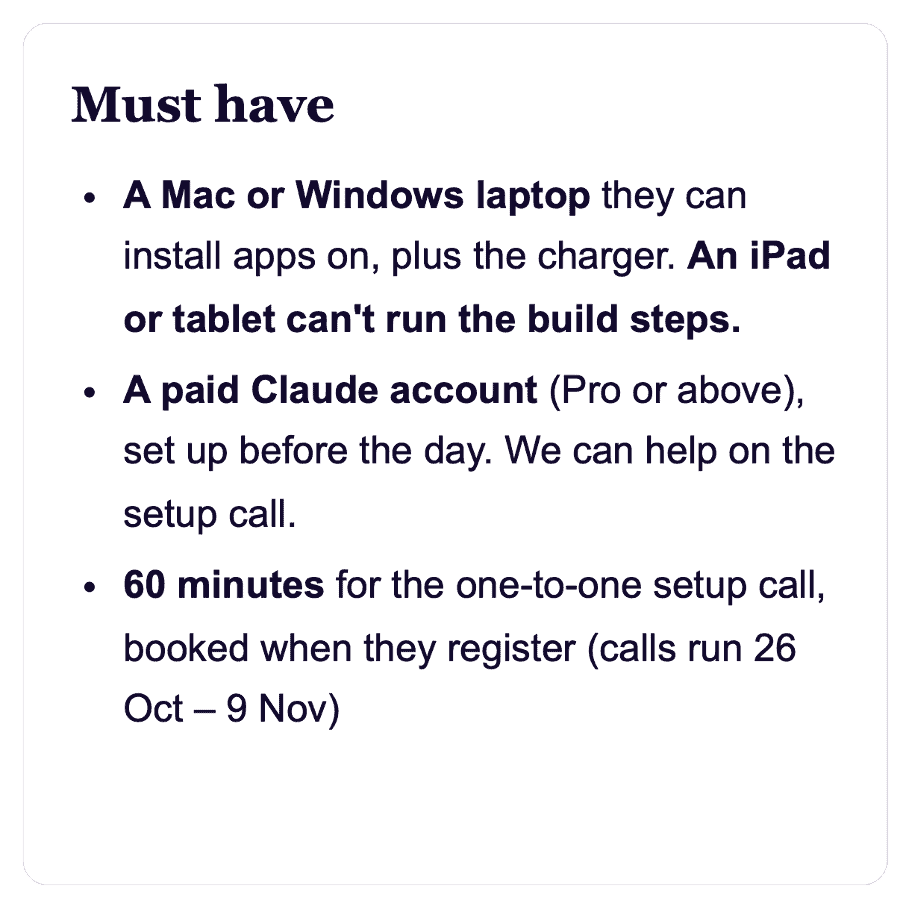
Booked at registration 26 Oct – 9 Nov 60 min |
Setup call |
– Confirm your laptop and Claude plan – Install the Claude desktop app together – Set up and check your workspace folder – Gather your business materials – Note three tasks worth exploring – Check what your IT team needs to approve |
Everything ready to start
building the moment you
arrive |
| WHEN | SESSION | WHAT YOU'LL DO | WHAT YOU'LL LEAVE WITH |
|---|---|---|---|
|
9:00–9:30 |
Morning Coffee and Claude brief |
– Get familiar with Claude and its capabilities – Discuss your business goals and current challenges – Identify what you want AI to help you achieve – Align on the day’s objectives and priorities |
A clear understanding of what we’ll build, your key priorities, and what success looks like by the end of the day |
|
9:30–11:00 |
1. Set Up Your AI
Workspace |
– Confirm your laptop and Claude plan – Install the Claude desktop app together – Set up and check your workspace folder – Gather your business materials – Note three tasks worth exploring – Check what your IT team needs to approve |
Everything ready to start
building the moment you
arrive |
|
11:00–12:30 |
2. Build Your
Business DNA |
– Capture your brand voice, ideal customers, products and services – Add your pricing, positioning and business rules – Connect your DNA to the workflow library – Test the workflows most relevant to you |
A reusable source of truth for
your AI, and workflows
producing accurate, on-brand
work |
|
12:30–1:30 |
Lunch |
|
|
|
1:30–3:00 |
3. Choose Your
Highest-Value
Workflow |
– Identify work to eliminate, automate or accelerate – Score each opportunity on value, frequency, complexity, risk and return – Select and scope one custom workflow |
A prioritised AI opportunity
map, and one well-scoped
workflow to build |
|
3:00–4:30 |
4. Design Your AI
Workflow |
– Map the workflow step by step – Define its inputs, outputs, business rules and approval points – Simulate it on realistic sample data, building nothing yet |
A complete workflow
blueprint, and a successful
simulated run |
|
4:30–5:00 |
Networking & Q&A |
|
|
| WHEN | SESSION | WHAT YOU'LL DO | WHAT YOU'LL LEAVE WITH |
|---|---|---|---|
|
9:00–9:30 |
Morning Coffee and Recap |
– Review the business blueprint and workflows created so far – Recap key decisions, priorities and outstanding questions – Confirm the AI system to build and the tools to connect – Align on the goals for the afternoon |
A confirmed build plan, clear priorities and a shared understanding of what the finished AI system should achieve |
|
9:30–11:00 |
5. Build Your
Custom AI System |
– Turn your blueprint into a working AI workflow – Add your instructions, business rules and success criteria – Complete the first end-to-end run in the sandbox, then improve it |
A working end-to-end system
operating safely in a sandbox |
|
11:00–12:30 |
6. Connect Your
Business Tools |
– Connect the tools your workflow needs: email, documents, CRM or accounting – Set what it can read and where drafts go – Complete a supervised run on real work |
A connected system working
inside your existing business
tools |
|
12:30–1:30 |
Lunch |
|
|
|
1:30–3:00 |
7. Test and Refine
Your System |
– Test normal and unusual cases – Find missing information, quality issues and failure points – Add safeguards, approvals and a way to recover |
A reliable system that performs
consistently within its scope |
|
3:00–4:30 |
8. Go Live With
Your Custom AI
System |
– Complete a controlled production run – Document how the system operates – Confirm ownership and oversight – Measure its expected impact – See it keep working from your phone |
A library of ready-to-use
workflows, and at least one
custom AI system doing
valuable work in your business |
|
4:30–5:00 |
Networking & Q&A |
|
|
For Melbourne SMB decision-makers who can approve investment, assign an owner, or commission an implementation and bring the right people into the decision.
“Pick a tool and hope the pilot pays off.”
“Bring us your recurring business headache and we’ll show you exactly how to fix it, and how to prove it worked.”
We collaborate with businesses to use technology to manage and transform their operations. Our focus is to provide customised technology solutions that combine the latest advances in digital transformation with a deep understanding of your business goals.
We use AI to turn scattered information into structured drafts, summarise documents and get routine work moving sooner. Our team still checks the output, but we spend less time starting from scratch and more time on the work that needs our expertise.
Corptec helps us bring customer requirements, product information and pricing rules together into a first AI program. We review the details before anything goes out, but preparing a quote is becoming a more consistent and repeatable process.
Instead of experimenting with tools without a clear goal, we focused on one recurring workflow, tested it against our needs and identified where human approval was essential. Now we have a practical next step and a clearer way to judge whether the investment is worthwhile.

With over 20 years of experience in the IT and services industry, Shane brings a strong blend of technical expertise and consultative sales leadership, helping enterprises solve complex challenges through tailored, scalable solutions.
Stay ahead with latest technology updates from Atlassian, Salesforce and more. Get expert tips, webinar workshops, industry data sheets delivered to your inbox.


